

Yield GET
The Yield API endpoint provides mean values of the specific yield calculations and detailed specific yield data for photovoltaic (PV) systems based on their site's location and installation characteristics. This endpoint supports GET requests that require latitude, longitude, as well as the slope and orientation of the PV system. By default, this endpoint calculates the specific yield for the years 2015 to 2024. Extended data up to the year 2007 is available as an add-on.
INFO
For users on the free plan, access is limited to mean specific yield values calculated over the past 10 years only; no detailed information about individual years, confidence intervals, or any other additional data is provided.
Base URL
The Base URL for this endpoint is:
https://api.pvnode.com/v1/yield/Example Request
The following examples demonstrate how to pass the required parameters and include the API key for authentication. The example uses a slope of 30 degrees, an orientation of 180 degrees (south-facing), and the location is set to Rosenheim, Germany with coordinates latitude: 47.84812, longitude: 12.06231.
import requests

url = 'https://api.pvnode.com/v1/yield/'
body = {
    "latitude": 47.84812,
    "longitude": 12.06231,
    "slope": 30,
    "orientation": 180
}
headers = {
    'Authorization': 'Bearer ' + YOUR_API_KEY
}
response = requests.get(url, headers=headers, params=body)
data = response.json()
Rate-Limits
The Rate-Limits for this endpoint are 6 requests per minute. If more requests are sent, a 429 response is returned.
Required parameters
| Parameter | Type | Description |
|---|---|---|
latitude | float | Latitude of the site's location. |
longitude | float | Longitude of the site's location. |
slope | float | Slope of the PV array in degrees, ranging from 0 to 90. |
orientation | float | Orientation of the PV array in degrees from north. 180 is south, and 270 is west. |
Optional parameters
| Parameter | Type | Description |
|---|---|---|
pv_power_kw | float | Standard test condition (STC) power in kWp of the first PV array. Must be specified if second_array_power_kw > 0. Default is 0. |
detailed_losses | boolean | If this parameter is set, detailed losses like DC to AC conversion losses, snow losses and others are returned. Default is False. |
pv_technology_type | string | PV model used for spectral mismatch calculations. Options include monosi, multisi, cdte, perc and topcon. Default: perc. |
temperature_coefficient_power | float | Temperature coefficient (%/K) of PV module efficiency. Default is -0.42. |
diffuse_radiation_model | string | Model used for diffuse radiation calculations. Options include perez and haydavies. Default: haydavies. |
panel_age_years | float | Age of the PV modules in years. Assumes a degradation of 0.5% per year. Default is 1. |
elevation | float | Height above sea level in meters. Default is -999, which uses elevation from high-resolution terrain data. |
installation_height | float | Installation height of the PV array. Default is 0. |
mounting_type | string | Mounting type of the PV array: open (open mounting), isol (isolated back, close rooftop installation), or mix. Default is open. |
ground_albedo | float | Ground albedo, ranging from 0 to 1. Default is 0.2. |
ground_coverage_ratio | float | Ground coverage ratio for row shading, typically ranges from 0 to 1. Default is 0 (no row shading). GCR calculator |
tracker_system_type | int | Tracker system configuration: 0 (no tracking), 1 (one-axis tracker), or 2 (two-axis tracker). Default is 0. Only applies on the first string. |
single_axis_tracker_config | string | Configuration details for a one-axis tracker. Detailed description. |
inverter_clip_max_threshold_percent | float | Percentage limit for AC output as a percentage of the nominal power (of the PV array). Default: 120. |
inverter_clip_min_threshold_percent | float | Minimum AC output as a percentage of the nominal power (of the PV array). Default: 0.1. |
sky_obstruction_config | string | Configuration that covers the sky dome obstructions (like mountains). Detailed description. |
terrain_based_horizon_coverage | bool | If activated, the horizon cover is obtained from our high precision terrain data. Default is false. |
shading_config | string | Shading configuration for the first PV array. Default is '', indicating no shading considered. Detailed description. |
snow_slide_coefficient | float | Coefficient used for snow calculations on PV arrays. Recommended to use 0.1-0.3 for rooftop installations and 0.3 - 0.6 for open mounting. Default: 0.14. |
enable_soiling_model | boolean | Determines whether a soiling model is calculated and considered. Default: false. |
soiling_model_config | string | Configuration parameters for soiling model. Default: 2:2:0.11:0.5. Detailed description. |
second_array_slope | float | Slope of the second PV array in degrees, ranging from 0 to 90. Must be specified if second_array_power_kw > 0. |
second_array_orientation | float | Orientation of the second PV array in degrees from north. 180 is south, 270 is west. Must be specified if second_array_power_kw > 0. |
second_array_ground_coverage_ratio | float | Ground coverage ratio for the second PV array. Default is 0. GCR calculator |
second_array_shading_config | string | Shading configuration for the second PV array. Default is '', indicating no shading considered. Detailed description. |
second_array_power_kw | float | STC power in kWp of the second PV array. Requires pv_power_kw > 0. |
prefer_american_satellites | boolean | Specifies whether to use American satellite regions when two regions overlap. Available only for overlapping regions in America. |
include_historical_data | boolean | Indicates whether data extending back to 2007 is used. Available only as an add-on. |
historical_data_start_year | integer | Specifies the starting year for data if include_historical_data is enabled. |
Additional Notes
Ground Coverage Ratio for intra row shading
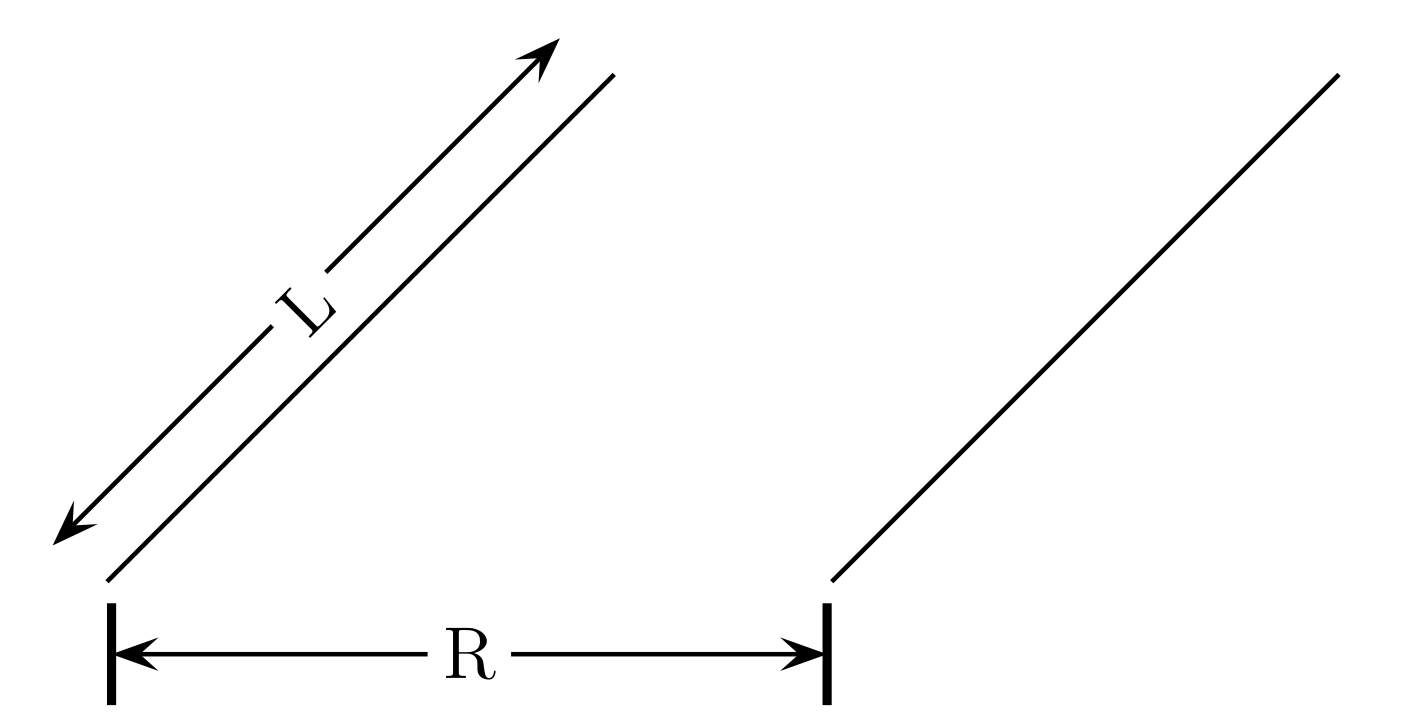
The Ground Coverage Ratio (GCR) quantifies the density of solar panels within a given area and is calculated using the formula:
where:
represents the length of the solar panel array. is the distance between consecutive rows of panels.
GCR Calculator
Please use our GCR calculator to calculate the GCR for your site.
Enter the length of the PV array (L):
Enter the row distance (R):
The Ground Coverage Ratio (GCR) is: 0.00
GCR visualized
The GCR helps in understanding how tightly panels are packed on the installation site, influencing potential shading and energy production efficiency.
Tracker configuration of the PV Array
The tracker1config parameter specifies the configuration of a one-axis solar tracker using four values separated by colons :.
- Axis Azimuth (degrees): Specifies the compass direction of the tracker's axis of rotation, ranging from 0 to 360 degrees. A value of 180 indicates south, with increasing angles moving towards the west.
- Axis Tilt (degrees): Defines the tilt of the tracker’s axis relative to the horizontal plane, ranging from 0 to 90 degrees.
- Maximum Rotation Angle (degrees): Sets the limits of the tracker's rotation, from 0 to 90 degrees. Negative angles equal in magnitude are implicitly included, allowing movement in the opposite direction.
- Backward Tracking (boolean): The
T(true) orF(false) value indicates whether the tracker employs backward tracking to prevent row shading during mornings and evenings.
single_axis_tracker_config = "180:0:90:T"This configuration describes a one-axis tracker with:
- Axis oriented south (180 degrees).
- No tilt (0 degrees).
- Capable of rotating from -90 to +90 degrees.
- Backward tracking enabled.
Sky Obstruction Configuration
sky_obstruction_config: This parameter configures obstructions that block parts of the sky dome, such as buildings, trees, or mountains. Configurations are represented by strings of three integers separated by colons:, with up to 10 such strings concatenated using underscores_.- Each string specifies:
- Start Azimuth Angle: The beginning angle in degrees from north where the obstruction starts.
- End Azimuth Angle: The angle in degrees from north where the obstruction ends.
- Elevation Angle: The maximum angle in degrees above the horizon that the obstruction covers.
Example Configurations:
sky_obstruction_config = 0:90:20describes an obstruction covering the north to east segment of the sky from 0° to 20° elevation.sky_obstruction_config = 0:90:20_180:270:30extends the coverage to include both the north-eastern segment from 0° to 20° elevation and a south-western segment from 0° to 30° elevation.
Shading Configuration
shading_config: This parameter defines the shading on the PV array throughout different times of the day and seasons, using strings of four integers separated by colons:.Each integer represents shading as a percentage (multiplied by 10) for each season—winter, spring, summer, and autumn.
Strings are concatenated using underscores
_to represent different times of the day:- Morning (6 AM - 10 AM): Defined by the first set of numbers, e.g., 7:2:3:1 indicates 70% shading in winter, 20% in spring, 30% in summer, and 10% in autumn.
- Midday (11 AM - 2 PM): Defined by the second set of numbers, e.g., 1:1:0:0 indicates 10% shading throughout winter and spring, with no shading during summer and autumn.
- Afternoon/Evening (3 PM - 8 PM): Defined by the third set of numbers, e.g., 0:0:0:0 would mean that no shading occurs between 3 PM and 8 PM in any season.
Example Configuration:
shading_config = 7:2:3:1_1:1:0:0_0:0:0:0indicates varying levels of shading across different times and seasons:- Strong morning shading in winter (70%), decreasing to no shading by the evening.
- Consistent mild shading at midday in winter and spring (10%), with none in the hotter months.
Soiling Configuration
soiling_config: This parameter consists of four values (separated by colons:) that define the soiling behavior of the PV modules.- Cleaning Time Window: The first value represents the number of hours that define the cleaning time window. This is the period during the day when cleaning can occur.
- Rainfall Threshold: The second value is the amount of rainfall in mm required within the cleaning time window to trigger a complete cleaning of the modules. If less rain falls, no cleaning occurs.
- Deposition Velocity (2.5 μm): The third value is the deposition velocity of particles with a size of approximately 2.5 μm, measured in cm/s. This determines how quickly these particles accumulate on the module surface.
- Deposition Velocity (10 μm): The fourth value is the deposition velocity of particles with a size of approximately 10 μm, measured in cm/s.
Default:
2:2:0.11:0.5
This default configuration indicates a 2-hour cleaning window, requiring 2 mm of rainfall for cleaning. It also sets the deposition velocities for 2.5 μm and 10 μm particles to 0.11 cm/s and 0.5 cm/s, respectively.