

Forecast GET
The Forecast API endpoint provides near-term, high-resolution 15-minute time-series data spanning +7 days and #30 days from the current day for photovoltaic (PV) systems based on their site's location and installation characteristics. This endpoint supports GET requests that require latitude, longitude, as well as the slope and orientation of the PV system.
INFO
For users on the free plan, forecast data is limited to +1 day (includes today and tomorrow) and no days in the past
Base URL
The Base URL for this endpoint is:
https://api.pvnode.com/v1/forecast/Example Request
The following examples demonstrate how to pass the required parameters and include the API key for authentication. The example uses a slope of 30 degrees, an orientation of 180 degrees (south-facing), and the location is set to Rosenheim, Germany with coordinates latitude: 47.84812, longitude: 12.06231.
import requests

url = 'https://api.pvnode.com/v1/forecast/'
body = {
    "latitude": 47.84812,
    "longitude": 12.06231,
    "slope": 30,
    "orientation": 180
}
headers = {
    'Authorization': 'Bearer ' + YOUR_API_KEY
}
response = requests.get(url, headers=headers, params=body)
data = response.json()
Rate-Limits
The Rate-Limits for this endpoint are 10 requests per second. If more requests are sent, a 429 response is returned.
Required parameters
| Parameter | Type | Description |
|---|---|---|
latitude | float | Latitude of the site's location. |
longitude | float | Longitude of the site's location. |
slope | float | Slope of the PV array in degrees, ranging from 0 to 90. |
orientation | float | Orientation of the PV array in degrees from north. 180 is south, and 270 is west. |
Optional parameters
| query parameter | type | description |
|---|---|---|
pv_only | boolean | Indicates if the calculations should only consider photovoltaic output, excluding auxiliary systems like air conditioning and heat pumps. Default: True. |
forecast_days | int | Number of forecast days considered for generating forecasts. Default: 7 days. |
past_days | int | Number of past days considered for generating forecasts. Default: 10 days. |
required_data | string | Required data columns formatted as a comma-separated list, specifying the types of data and metrics needed for analysis. All Data Columns |
pv_power_kw | float | Standard test condition (STC) power in kWp of the first PV array. Must be specified if second_array_power_kw > 0. Default is 0. |
pv_technology_type | string | PV model used for spectral mismatch calculations. Options include monosi, multisi, cdte, perc and topcon. Default: perc. |
temperature_coefficient_power | float | Temperature coefficient (%/K) of PV module efficiency. Default is -0.42. |
diffuse_radiation_model | string | Model used for diffuse radiation calculations. Options include perez and haydavies. Default: haydavies. |
panel_age_years | float | Age of the PV modules in years. Assumes a degradation of 0.5% per year. Default is 1. |
elevation | float | Height above sea level in meters. Default is -999, which uses elevation from high-resolution terrain data. |
installation_height | float | Installation height of the PV array. Default is 0. |
mounting_type | string | Mounting type of the PV array: open (open mounting), isol (isolated back, close rooftop installation), or mix. Default is open. |
ground_albedo | float | Ground albedo, ranging from 0 to 1. Default is 0.2. |
ground_coverage_ratio | float | Ground coverage ratio for row shading, typically ranges from 0 to 1. Default is 0 (no row shading). GCR calculator |
tracker_system_type | int | Tracker system configuration: 0 (no tracking), 1 (one-axis tracker), or 2 (two-axis tracker). Default is 0. Only applies on the first string. |
single_axis_tracker_config | string | Configuration details for a one-axis tracker. Detailed description. |
inverter_clip_max_threshold_percent | float | Percentage limit for AC output as a percentage of the nominal power (of the PV array). Default: 120. |
inverter_clip_min_threshold_percent | float | Minimum AC output as a percentage of the nominal power (of the PV array). Default: 0.1. |
sky_obstruction_config | string | Configuration that covers the sky dome obstructions (like mountains). Detailed description. |
terrain_based_horizon_coverage | bool | If activated, the horizon cover is obtained from our high precision terrain data. Default is false. |
shading_config | string | Shading configuration for the first PV array. Default is '', indicating no shading considered. Detailed description. |
snow_slide_coefficient | float | Coefficient used for snow calculations on PV arrays. Recommended to use 0.1-0.3 for rooftop installations and 0.3 - 0.6 for open mounting. Default: 0.14. |
second_array_slope | float | Slope of the second PV array in degrees, ranging from 0 to 90. Must be specified if second_array_power_kw > 0. |
second_array_orientation | float | Orientation of the second PV array in degrees from north. 180 is south, 270 is west. Must be specified if second_array_power_kw > 0. |
second_array_ground_coverage_ratio | float | Ground coverage ratio for the second PV array. Default is 0. GCR calculator |
second_array_shading_config | string | Shading configuration for the second PV array. Default is '', indicating no shading considered. Detailed description. |
second_array_power_kw | float | STC power in kWp of the second PV array. Requires pv_power_kw > 0. |
cable_loss_rate | float | Percentage loss expected due to cable resistance, impacting overall system efficiency. Default: 0.015 (1.5%). |
conversion_loss_rate | float | Direct current to alternating current conversion loss rate, affecting the efficiency of power output from storage or solar panels. Default: 0.025 (2.5%). |
yearly_energy_consumption | float | Yearly electrical energy consumption excluding the heat pump, measured in MWh/year. Default: 4.0 MWh. |
yearly_heat_pump_consumption | float | Yearly electrical energy consumption for the heat pump, measured in MWh/year. Default: 5.0 MWh. |
battery_capacity | float | Total capacity of the power storage system, measured in kWh. Default: 10 kWh. |
air_cool_config | string | Configuration string for optional air conditioning systems, left empty by default (''). Detailed description. |
air_cool_temperature_threshold | float | Temperature threshold (mean daily temperature) for activating air conditioning, measured in degrees Celsius. Default: 21.0°C. |
air_cool_peak_power | float | Peak power consumption of the air conditioning system, measured in kW. Default: 1.0 kW. |
charge_power_ratio | float | Maximum charge power relative to the battery capacity; for example, 0.5 corresponds to 50% of the battery's capacity being usable for charging. Default: 0.5. |
discharge_power_ratio | float | Maximum discharge power relative to the battery capacity, indicating how much power can be drawn at one time. Default: 0.5. |
battery_efficiency | float | Efficiency of the power storage system, accounting for losses due to self-discharge and DC to AC conversion; 0.94 means 94% efficiency, with a 6% loss. |
demand_profile | string | Specifies the yearly load profile for electrical demand (excluding the heat pump), which defines how energy consumption is distributed over time. Default: h0_dyn. |
timezone | string | Time zone setting for all timestamped data entries. Default: 'UTC'. |
Additional Notes
Ground Coverage Ratio for intra row shading
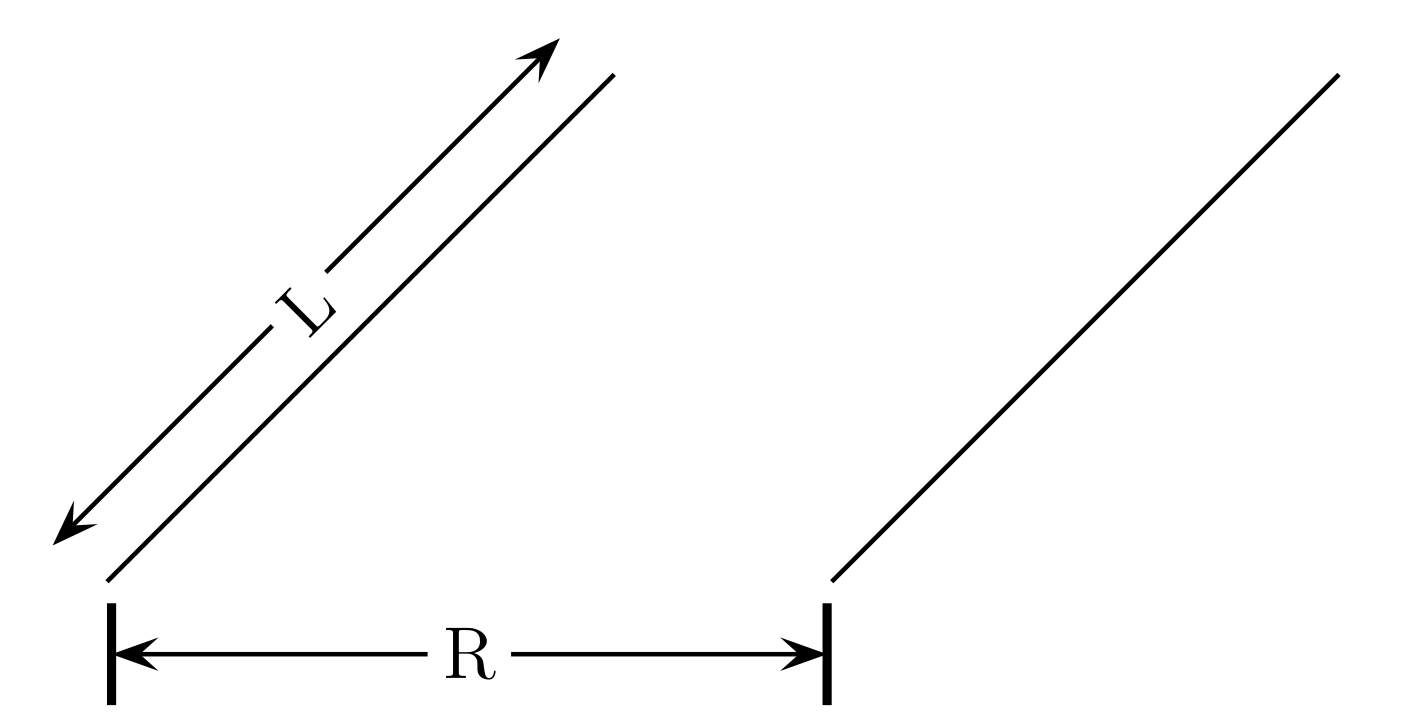
The Ground Coverage Ratio (GCR) quantifies the density of solar panels within a given area and is calculated using the formula:
where:
represents the length of the solar panel array. is the distance between consecutive rows of panels.
GCR Calculator
Please use our GCR calculator to calculate the GCR for your site.
Enter the length of the PV array (L):
Enter the row distance (R):
The Ground Coverage Ratio (GCR) is: 0.00
GCR visualized
The GCR helps in understanding how tightly panels are packed on the installation site, influencing potential shading and energy production efficiency.
Tracker configuration of the PV Array
The tracker1config parameter specifies the configuration of a one-axis solar tracker using four values separated by colons :.
- Axis Azimuth (degrees): Specifies the compass direction of the tracker's axis of rotation, ranging from 0 to 360 degrees. A value of 180 indicates south, with increasing angles moving towards the west.
- Axis Tilt (degrees): Defines the tilt of the tracker’s axis relative to the horizontal plane, ranging from 0 to 90 degrees.
- Maximum Rotation Angle (degrees): Sets the limits of the tracker's rotation, from 0 to 90 degrees. Negative angles equal in magnitude are implicitly included, allowing movement in the opposite direction.
- Backward Tracking (boolean): The
T(true) orF(false) value indicates whether the tracker employs backward tracking to prevent row shading during mornings and evenings.
single_axis_tracker_config = "180:0:90:T"This configuration describes a one-axis tracker with:
- Axis oriented south (180 degrees).
- No tilt (0 degrees).
- Capable of rotating from -90 to +90 degrees.
- Backward tracking enabled.
Sky Obstruction Configuration
sky_obstruction_config: This parameter configures obstructions that block parts of the sky dome, such as buildings, trees, or mountains. Configurations are represented by strings of three integers separated by colons:, with up to 10 such strings concatenated using underscores_.- Each string specifies:
- Start Azimuth Angle: The beginning angle in degrees from north where the obstruction starts.
- End Azimuth Angle: The angle in degrees from north where the obstruction ends.
- Elevation Angle: The maximum angle in degrees above the horizon that the obstruction covers.
Example Configurations:
sky_obstruction_config = 0:90:20describes an obstruction covering the north to east segment of the sky from 0° to 20° elevation.sky_obstruction_config = 0:90:20_180:270:30extends the coverage to include both the north-eastern segment from 0° to 20° elevation and a south-western segment from 0° to 30° elevation.
Shading Configuration
shading_config: This parameter defines the shading on the PV array throughout different times of the day and seasons, using strings of four integers separated by colons:.Each integer represents shading as a percentage (multiplied by 10) for each season—winter, spring, summer, and autumn.
Strings are concatenated using underscores
_to represent different times of the day:- Morning (6 AM - 10 AM): Defined by the first set of numbers, e.g., 7:2:3:1 indicates 70% shading in winter, 20% in spring, 30% in summer, and 10% in autumn.
- Midday (11 AM - 2 PM): Defined by the second set of numbers, e.g., 1:1:0:0 indicates 10% shading throughout winter and spring, with no shading during summer and autumn.
- Afternoon/Evening (3 PM - 8 PM): Defined by the third set of numbers, e.g., 0:0:0:0 would mean that no shading occurs between 3 PM and 8 PM in any season.
Example Configuration:
shading_config = 7:2:3:1_1:1:0:0_0:0:0:0indicates varying levels of shading across different times and seasons:- Strong morning shading in winter (70%), decreasing to no shading by the evening.
- Consistent mild shading at midday in winter and spring (10%), with none in the hotter months.
Available Data Columns
The following table displays all available data columns in the dataset. Each value in the time series represents the average value over a 15-minute interval:
| data | description | unit |
|---|---|---|
GHI | Global Horizontal Irradiation measured on horizontal plane | W/m² |
BNI | Beam Normal Irradiation | W/m² |
DHI | Diffuse Horizontal Irradiation | W/m² |
GTI | Global Tilted Irradiation on a PV panel in the plane (unshaded) | W/m² |
GTI_shaded | Global Tilted Irradiation on a PV panel in the plane (after all shading calculations) | W/m² |
temp | Temperature measured 2 meters above ground | °C |
RH | Relative Humidity | % |
precip | Total precipitation | mm |
vwind | wind speed measured 10 meters above ground | m/s |
weather_code | Weather Code, see table above | - |
snow_height | Snow Height on ground as water equivalent | mm |
spec_watts | Generated Specific Watts of the PV-array/s | W/kWp |
pv_watts | Generated Watts of the PV-array/s | W |
battery_state | Charge state of the battery | Wh |
external_energy | External Energy used to satisfy total electric load | Wh |
feed_in | Excess Energy which is fed in grid | Wh |
battery_charge | Energy used for charging the battery | Wh |
total_elec_dem | Total electric demand | W |
load_jv | Electric demand specified by demand profile | W |
load_hp | Electric demand used by heat pump | W |
air_cond_load | Electric demand used by air conditioning | W |
Weather Codes
Interpretation of weather codes:
| code | description |
|---|---|
| 0 | clearsky |
| 1,2,3 | mainly clear, partly cloudy, overcast |
| 45,48 | fog and depositing rime fog |
| 51,53,55 | drizzle: light, moderte, dense intensity |
| 56,57 | freezing drizzle: light and intense density |
| 61,63,65 | rain: slight, moderate, heavy intensity |
| 66,67 | freezing rain: light and heavy intensity |
| 71,73,75 | snow fall: slight, moderate, heavy intensity |
| 77 | snow grains |
| 80,81,82 | rain showers: slight, moderate, violent |
| 85,86 | snow showers: slight and heavy |
| 95 | thunderstorm |
| 96,99 | thunderstorm with slight and heavy hail |
Air Conditioner Configuration
The air_cond_config parameter configures the operational schedule of an air conditioning system using a 12-digit binary string. Each digit represents a 2-hour block within a 24-hour day, where '1' indicates the air conditioner is turned on and '0' signifies it is off.
For example:
air_cool_config = 000110001100
This configuration means the air conditioning is active from 6 a.m. to 10 a.m. and from 4 p.m. to 8 p.m.
The operational efficiency of the air conditioning is modeled as a step function starting at 50% of the peak power at the temperature threshold set by air_cool_temperature_threshold. It then linearly increases to 100% peak power as the mean outside temperature rises to air_cool_temperature_threshold + 8 K.
Demand Profile
The demand_profile parameter defines the electric load profile based on typical consumption patterns, normalized to a demand of 1 MWh per year. This demand is then scaled by the yearly electrical energy consumption parameter yearly_energy_consumption.
| Profile | Description |
|---|---|
| g0 | General trade/business/commerce (weighted average of profiles g1-g6) |
| g1 | Business, typical office hours from 8 a.m. to 6 p.m. on weekdays |
| g2 | Businesses with heavy consumption primarily in the evening |
| g3 | Continuous operations, e.g., cold stores, pumps, sewage treatment plants |
| g4 | Shops or services like barber shops with day-time operating hours |
| g5 | Bakeries, typically early morning to afternoon |
| g6 | Weekend operations, e.g., cinemas |
| g7 | Mobile phone transmitter stations with continuous load |
| l0 | General farms (weighted average of profiles l1 and l2) |
| l1 | Farms with dairy operations |
| l2 | Other types of farms |
| h0 | Typical household load |
| h0_dyn | Household with a dynamic consumption profile varying across seasons |